本笔记尚未完成!
上次出 urdf 的笔记:从XML开始学习编写URDF
进一步补充,要求多个参数的 xacro 只给少几个参数会如何
答:没问题,继续执行,没给参数的就是0
todo:进一步补充
<safety_controller k_position="100" k_velocity="0.1"
                   soft_lower_limit="${pitch_lower_limit+threshold}"
                   soft_upper_limit="${pitch_upper_limit-threshold}"/>
怎么用
$(arg var):专门用于获取外部传入的变量(Launch 文件或命令行参数)。${var}:用于 Python 表达式计算、数学运算或获取内部定义的常量(Property)
区分xacro:property 和xacro:arg
排错:关注标签是否闭合,关注参数名称是否完全对应
¶ 笔记 :给实车出 urdf
以 legged_balance 为例,队内车 urdf 文件一般由以下结构组成 :
- legged_balance.urdf.xacro 核心文件,按需(参数决定)包含底盘、云台、发射器等部分
- chassis.urdf.xacro 底盘文件,定义 base_link ,包含并实例化 leg,将他们按照相应的结构连接。并联腿平衡步兵在这里通过 gazebo 标签将前腿和后腿相连从而绕开 urdf 不支持闭链描述的问题。比较特殊的是:平衡步兵轮子的定义是在 chassis 文件中
- leg.urdf.xacro 腿文件,如果是全向轮或麦轮这里则是类似 omni.urdf.xacro 等定义轮子的文件。本文件定义连杆结构的四条腿(四个 link:前第一、前第二、后第一、后第二)和相应的 joint
- leg.transmission.urdf.xacro 腿文件的传动,为腿文件里定义的 joint 定义 transmission 属性,包含控制器类型(EffortJointInterface)、电机名称、减速比、offset 等参数
- gimbal.urdf.xacro 云台文件,重点是 yaw 和 pitch 两个 link,相应的 joint 将 pitch 连上 yaw,将 yaw 连上 base_link
- gimbal.transmission.urdf.xacro 云台结构的传动,包含 yaw 和 pitch 的 joint 的传动
- shooter.urdf.xacro 发射结构,调用并实例化 common 里写好的摩擦轮,同时自己定义一个 trigger(拨弹盘)
- shooter.transmission.urdf.xacro 发射结构的传动,包含两个摩擦轮的 joint 传动和拨弹盘的 joint 传动
可以发现队内车的构成相当模块化,以底盘作为 base_link,连接起不同的组件。transmission 的定义独立于 link 和 joint 方便修改 offset 等参数
考虑到上层的文件基本都是对下层文件的实例化,下面的介绍从底层文件开始
¶ leg.urdf.xacro
本文件通过宏规定了腿的各项参数。对于并联腿,一侧有四个link和四个joint:
- front first leg
- front second leg
- back first leg
- back second leg
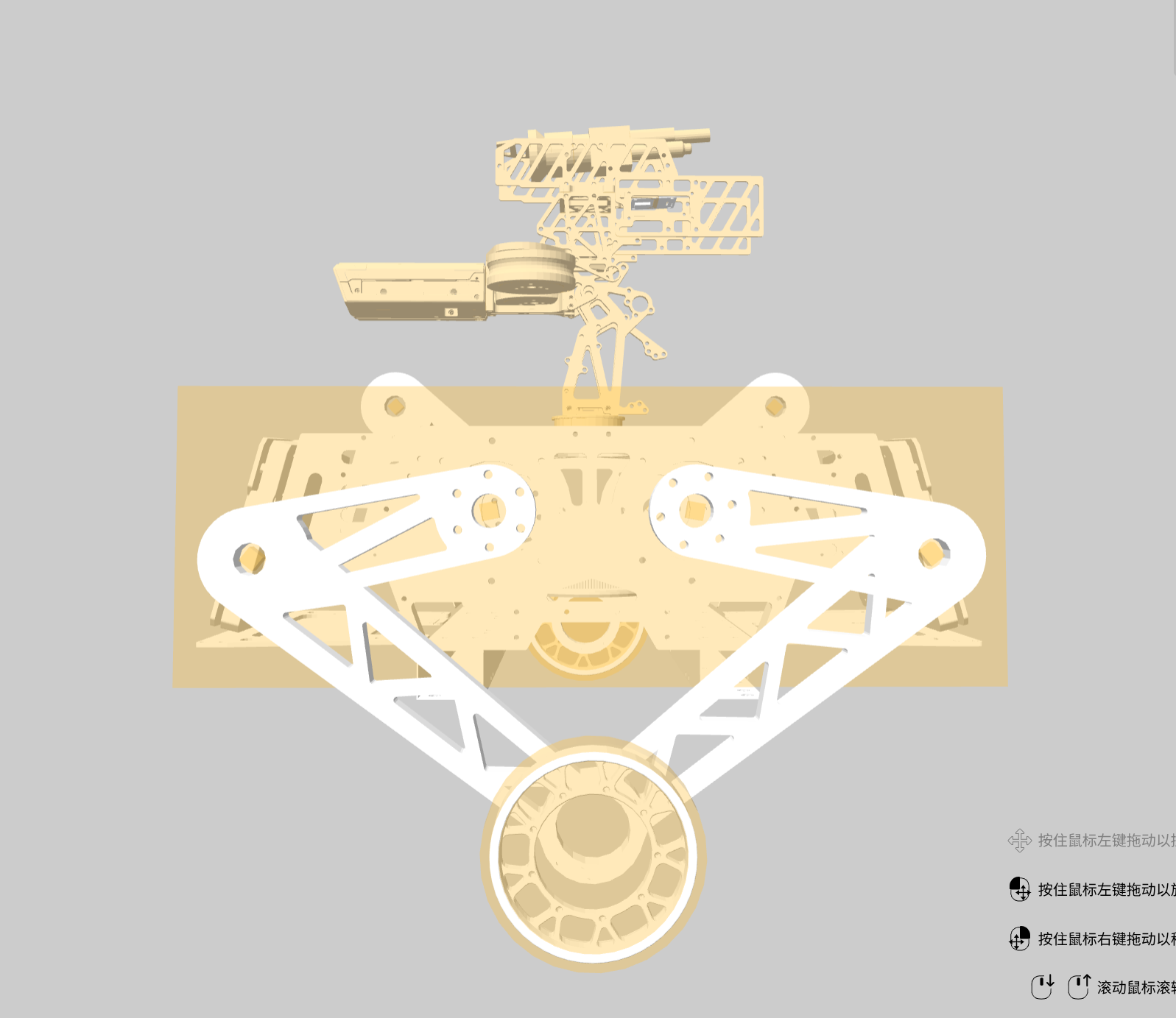
考虑到前后完全一致,这里定义一组first和second即可完整全部腿的定义。在实际编写时,将全部存在差异的参数通过参数提供:
        <joint name="${prefix}_second_leg_joint" type="continuous">
            <axis xyz="0 1 0"/>
            <origin xyz="${leg_x_offset} ${leg_y_offset} ${leg_z_offset}" rpy="0 ${pitch_offset} 0"/>
            <parent link="${connected_to}"/>
            <child link="${prefix}_second_leg"/>
            <dynamics damping="0.0" friction="0.001"/>
        </joint>
¶ leg.transmission.xacro
本文件规定了一侧全部腿,共四个joint的传动。再非仿真的情况,其规定了特殊的五连杆传动类型:
        <xacro:unless value="${use_simulation}">
            <transmission name="${prefix}_leg_trans">
                <type>transmission_interface/FiveLinkTransmission</type>
                <actuator name="${prefix}_back_leg_joint_motor">
                    <mechanicalReduction>${mechanical_reduction}</mechanicalReduction>
                    <offset>${back_offset}</offset>
                    <l1>${l1}</l1>
                    <l2>${l2}</l2>
                    <l5>${l5}</l5>
                </actuator>
                <actuator name="${prefix}_front_leg_joint_motor">
                    <mechanicalReduction>${mechanical_reduction}</mechanicalReduction>
                    <offset>${front_offset}</offset>
                    <l1>${l1}</l1>
                    <l2>${l2}</l2>
                    <l5>${l5}</l5>
                </actuator>
                <joint name="${prefix}_back_first_leg_joint">
                    <hardwareInterface>hardware_interface/EffortJointInterface</hardwareInterface>
                </joint>
                <joint name="${prefix}_front_first_leg_joint">
                    <hardwareInterface>hardware_interface/EffortJointInterface</hardwareInterface>
                </joint>
                <joint name="${prefix}_back_second_leg_joint">
                    <pitch_offset>-${second_leg_pitch_offset}</pitch_offset>
                    <hardwareInterface>hardware_interface/EffortJointInterface</hardwareInterface>
                </joint>
                <joint name="${prefix}_front_second_leg_joint">
                    <pitch_offset>${second_leg_pitch_offset}</pitch_offset>
                    <hardwareInterface>hardware_interface/EffortJointInterface</hardwareInterface>
                </joint>
            </transmission>
        </xacro:unless>
¶ gimbal.urdf.xacro
本文件直接规定了云台上的 yaw,pitch link以及相对应的joint。还特别规定了几个没有物理属性的link作为特别的参考系供视觉使用(urdf规定了坐标变换),如:
    <link name="flank_frame"/>
    <joint name="flank_joint" type="fixed">
        <origin xyz="0 0 0" rpy="0 0 ${pi/2}"/>
        <parent link="yaw"/>
        <child link="flank_frame"/>
    </joint>
和
    <link name="yaw_reverse_frame"/>
    <joint name="yaw_reverse_joint" type="fixed">
        <origin xyz="0 0 0" rpy="0 0 ${pi}"/>
        <parent link="yaw"/>
        <child link="yaw_reverse_frame"/>
    </joint>
¶ gimbal.transimission.urdf.xacro
规定云台各joint的传动
¶ shooter.urdf.xacro
定义摩擦轮link和拨弹盘(trigger)link以及对应的joint。前者使用队内现成的实现:
    <xacro:include filename="$(find rm_description)/urdf/common/friction.urdf.xacro"/>

    <xacro:property name="wheel_offset_x" value="0.041"/>
    <xacro:property name="wheel_offset_y" value="0.036"/>
    <xacro:property name="wheel_offset_z" value="0.0"/>


    <xacro:friction_wheel prefixs="left" connected_to="pitch"
                          wheel_x_offset="${wheel_offset_x}" wheel_y_offset="${wheel_offset_y}"
                          wheel_z_offset="${wheel_offset_z}"/>

    <xacro:friction_wheel prefixs="right" connected_to="pitch"
                          wheel_x_offset="${wheel_offset_x}" wheel_y_offset="${-wheel_offset_y}"
                          wheel_z_offset="${wheel_offset_z}"/>
¶ shooter.transmission.urdf.xacro
规定摩擦轮和拨弹盘joint对应的传动
¶ legged_balance.urdf.xacro
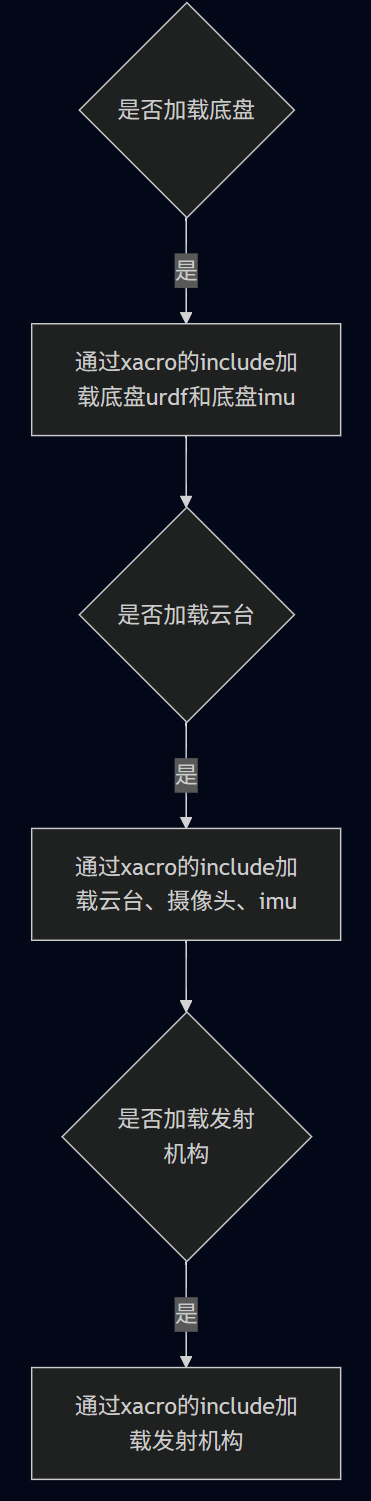
这个文件除了加载云台、底盘、发射机构等结构还将 imu 和 camera 附加上了车子。底盘有一个 imu,云台有一个 imu 和一个 camera
我们会发现如下代码包含两个 xacro:camera_optical_frame ,是视觉组用的摄像机的两组参数
<xacro:camera_optical_frame xyz="0.06059775176285364 0.000087 0.09256327160978175"
                            rpy="-1.6441064 0 -1.5807963"
                            frame_id="$(arg camera_optical_frame)"
                            parent="pitch"
                            camera_sim="false"/>
<xacro:camera_optical_frame xyz="0.06059775176285364 0.000087 0.09256327160978175"
                            rpy="-1.6501064 0 -1.53057963"
                            frame_id="$(arg camera2_optical_frame)"
                            parent="pitch"
                            camera_sim="false"/>
本文件还需要规定仿真时采用的 RobotHW
<xacro:if value="$(arg use_simulation)">
    <gazebo>
        <plugin name="rm_ros_control" filename="librm_robot_hw_sim.so">
            <robotNamespace>/</robotNamespace>
            <robotSimType>rm_gazebo/RmRobotHWSim</robotSimType>
        </plugin>
    </gazebo>
</xacro:if>
需要加载队内的机器人仿真类型,通过 use_simulation 参数判断是否加载仿真插件。
¶ chassis.urdf.xacro
本文件将两侧的leg实例化,同时通过gazebo标签处理urdf不支持闭链结构的问题:
        <gazebo>
            <joint name="right_connect_joint" type="revolute">
                <parent>right_front_second_leg</parent>
                <child>right_back_second_leg</child>
                <axis>
                    <xyz>0 1 0</xyz>
                </axis>
                <pose>0 0 -0.25 0 0 0</pose>
            </joint>
        </gazebo>
注意其中的pose
pose描述了子link坐标系到joint坐标系的变换关系,那pose如何判断父坐标系和joint坐标系的关系呢?答案是在之前的模型建立中,我们就有父link和子link的坐标变换关系了,在世界坐标系中二者的位置已经确定,进而我们可以确定joint在世界坐标系的位置,该位置也将和父亲link相连